
Fiber vs. Cable Internet: How the Two Most Common Home Options Stack Up

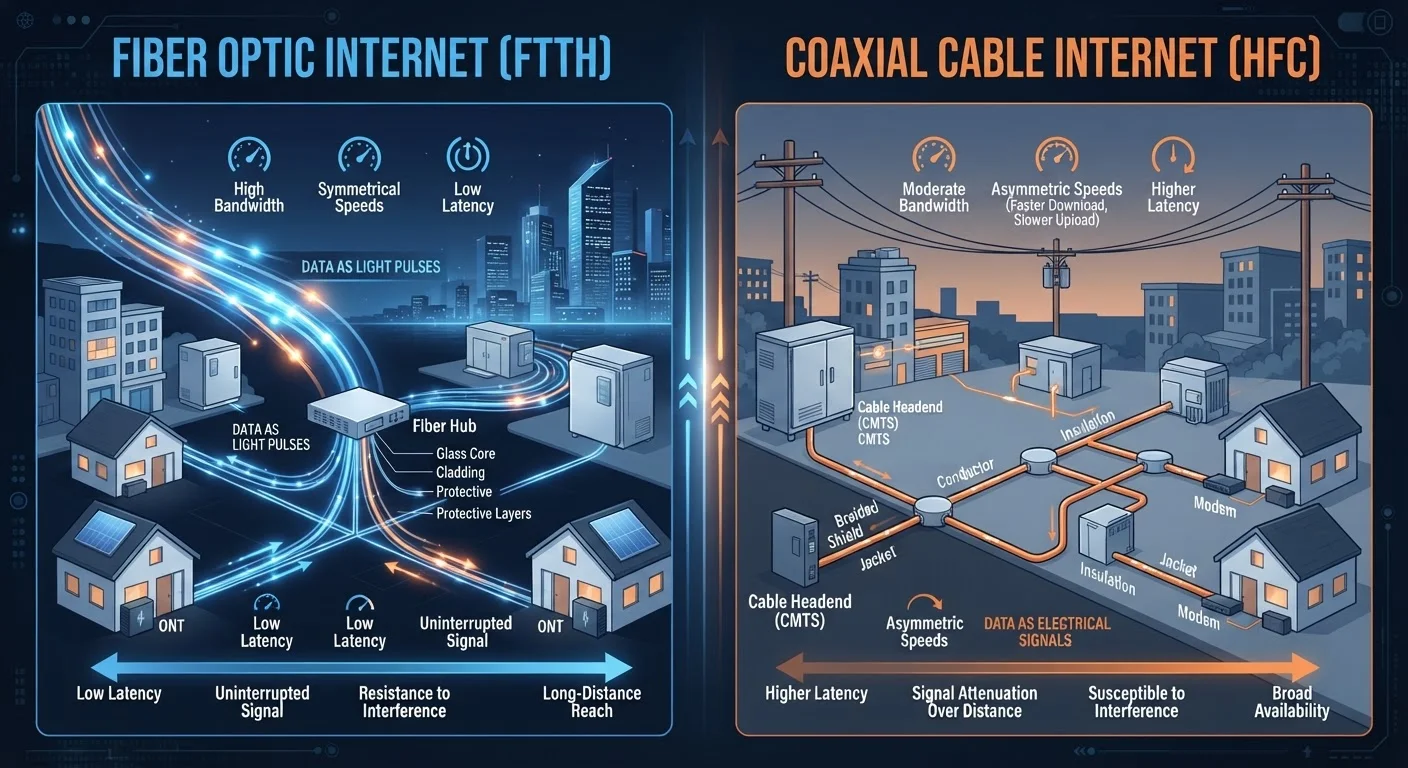
Photo: QuickSearches.net | It Doesn't Get Quicker Than This! editorial
Key Takeaways
- Fiber transmits data as pulses of light; cable uses the same coaxial lines originally built for TV.
- Fiber typically delivers equal upload and download speeds; cable upload speeds are usually much slower.
- Cable internet is available to roughly 89% of U.S. households; fiber reaches closer to 43%.
- Both technologies can deliver speeds sufficient for most households when the plan tier is appropriate.
- Fiber tends to be more consistent during peak hours because it is less susceptible to neighborhood congestion.
How Each Technology Actually Works
Understanding what separates fiber from cable starts with the physical infrastructure each one uses - and the difference is significant.
Fiber-optic internet transmits data as pulses of light through thin glass or plastic strands. Because light travels fast and the signal doesn't degrade over distance the way electrical signals do, fiber can maintain high speeds across longer runs of cable with minimal interference. Most fiber deployments bring the cable all the way to your home (often called FTTH - Fiber to the Home), meaning you're connected to glass from the street to your router.
Cable internet piggybacks on coaxial cable infrastructure originally built for cable television. It uses a technology called DOCSIS (Data Over Cable Service Interface Specification) to carry broadband signals over those same lines. Unlike fiber, cable is a shared-medium technology at the neighborhood level - multiple nearby households share bandwidth on the same segment of line. Cable has improved dramatically through DOCSIS 3.1 and the emerging DOCSIS 4.0 standard, but the shared architecture remains a fundamental design difference.
For a broader look at how these fit into the full picture of home internet options, see our end-to-end home internet resource.
Speed: Downloads, Uploads, and the Gap That Matters
When ISPs advertise speeds, they lead with download figures - and that's where cable can look competitive. Many cable plans offer download speeds of 200 Mbps to 1 Gbps, which is sufficient for most households. Fiber plans frequently offer the same download range, and increasingly offer multi-gigabit tiers.
The real gap is on the upload side. Fiber is inherently symmetrical: a 500 Mbps fiber plan typically delivers 500 Mbps in both directions. Cable, by design, allocates far less capacity to uploads - a 500 Mbps download cable plan might offer only 10-20 Mbps upload. For a household that primarily streams video, this asymmetry is largely invisible. For anyone uploading large files, backing up to the cloud, or on frequent video calls, it becomes a daily friction point.
| Criterion | Fiber Internet | Cable Internet |
|---|---|---|
| Infrastructure | Glass/plastic fiber optic strands | Coaxial cable (shared medium) |
| Typical download speeds | 200 Mbps - 2+ Gbps | 100 Mbps - 1 Gbps |
| Typical upload speeds | Symmetrical (matches download) | 10-50 Mbps on most plans |
| Typical latency | 5-15 ms | 15-35 ms |
| Peak-hour congestion risk | Low (dedicated lines) | Moderate (shared neighborhood segment) |
| U.S. household availability | ~43% of homes | ~89% of homes |
Not sure how much speed your household actually needs? Our speed guide breaks it down by activity and household size so you can match a plan to your real usage.
Reliability and Consistency Under Real Conditions
Raw speed numbers tell only part of the reliability story. Two other factors matter considerably in daily use: latency and congestion.
Latency - the time it takes for a data packet to travel from your device to a server and back - is typically lower on fiber. This matters most for real-time applications like video calls, online gaming, and interactive cloud tools. Fiber latency commonly falls in the 5-15 millisecond range; cable often runs 15-35 ms, which is still acceptable for most tasks but can be noticeable during lag-sensitive activities.
Congestion is where cable's shared-medium design shows up most plainly. During peak evening hours, when many households in a neighborhood are streaming simultaneously, available bandwidth on a cable segment can dip noticeably. Fiber, because it uses dedicated connections from the provider's equipment to your home, is considerably less susceptible to this neighborhood-level slowdown.
DOCSIS 4.0: Cable's Next Step
Both technologies have improved substantially in recent years. Modern cable using DOCSIS 3.1 is far more capable than the cable internet of a decade ago. The gap versus fiber has narrowed in raw download throughput, even if upload speeds and congestion behavior remain differentiated.
Once you've chosen a connection type, how you set up your home network also shapes reliability. Practical habits like router placement and firmware updates make a meaningful difference regardless of which service you have.
Availability: Where You Live Often Decides for You
For many households, the choice between fiber and cable isn't truly a choice - it's determined by what's been built in their area. Fiber buildout, while expanding rapidly, lags significantly behind the decades-old cable infrastructure.
~89%
U.S. homes with cable internet access
According to FCC broadband availability data, cable infrastructure covers the large majority of American households due to decades of coaxial buildout.
~43%
U.S. homes with fiber internet access
Fiber availability has grown substantially in recent years but remains significantly less widespread than cable, particularly outside major metropolitan areas.
10-20 Mbps
Typical cable upload speed on mid-tier plans
Industry data consistently shows cable upload speeds lag far behind download allocations due to the asymmetric design of traditional DOCSIS architecture.
Suburban and urban households typically have cable available; fiber availability in those same areas is growing but uneven. Rural areas are underserved by both technologies - if you're outside a major metro, you may find that neither fiber nor cable reaches you, in which case fixed wireless or satellite are more relevant options. See how fixed wireless and DSL compare if that describes your situation.
Checking what's available at your specific address - rather than relying on a carrier's general coverage map - is always the most reliable approach. The FCC's National Broadband Map and your state's broadband office can be useful starting points for verification.
The content on this site is provided for informational purposes only and should not be considered a substitute for professional advice. While we strive to provide accurate and up-to-date information, we make no guarantees regarding its completeness or accuracy. Always consult a qualified professional for advice specific to your circumstances before making any decisions